
Microsoft Copilot Now Builds Office Documents and Apps For You
Microsoft's Ignite update turns Copilot into a tool that writes documents and builds simple apps from plain words.
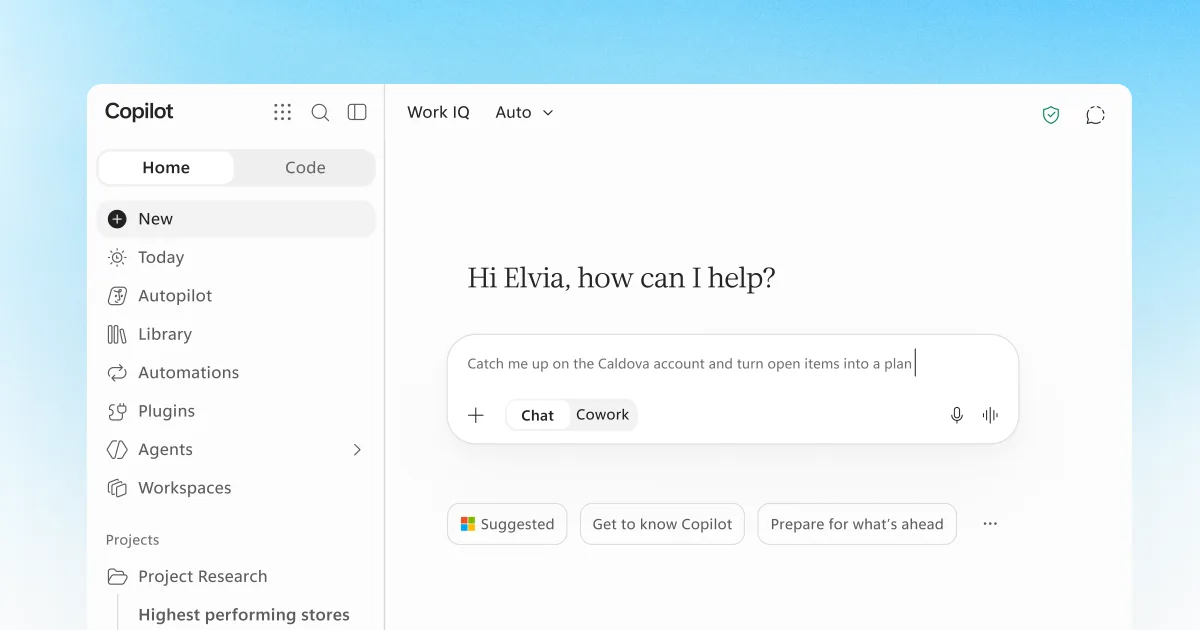
Image: Microsoft
Quick Summary
- Microsoft made Office in Copilot generally available at Ignite 2026 on 17 November, bringing full Word, Excel and PowerPoint editing directly into the Copilot app.
- Copilot Code, rolling out within weeks, lets anyone describe an app, dashboard or desktop widget in plain words and have Copilot build it, shareable like a Word document.
- Microsoft's new Auto routing lets a business manually choose between OpenAI and Anthropic models inside Copilot, subject to company policy.
- Alibaba also launched its Qwen4-Max model this week claiming roughly 60 percent lower average cost per task than its prior flagship.
Microsoft used its Ignite 2026 conference on 17 November to make Office in Copilot generally available, so the Copilot app can now create and edit full Word, Excel and PowerPoint files. A new feature called Copilot Code also lets anyone describe a simple app and have Copilot build it, no developer needed.
What is new in Microsoft Copilot for business?
Jared Spataro, Chief Marketing Officer for Copilot at Microsoft, wrote that the company is bringing the full power of Office directly into the Copilot app, so you can move from an idea to a finished document, editing and coauthoring with teammates, without switching between separate programs. Files keep their existing Microsoft 365 permissions, sensitivity labels and compliance controls, which matters for any business handling client data.
Microsoft also announced Copilot Managed Runtime, which is generally available now and lets IT staff see and manage every Copilot-built app from the Microsoft 365 admin center, and a new Home view that merges chat and ongoing project work into one starting point.
This connected experience helps our organization work from shared customer context.from Christian Lewis, Managing Director, Commercial Hub Co-Lead, BNY (Microsoft, 17 November 2026)
What can Copilot actually do now?
- Office in Copilot: create, edit and coauthor Word documents, Excel spreadsheets and PowerPoint decks inside the Copilot app (generally available now).
- Copilot Code: describe an app, interactive dashboard or desktop widget in plain words and Copilot builds it, shareable like a Word document (rolling out within weeks).
- Copilot Managed Runtime: IT can see and manage every Copilot-built app in one place (generally available now).
- Auto routing: Copilot picks a model and effort level for the task automatically, or your team can manually choose an OpenAI or Anthropic model, subject to company policy.
- A growing plugin catalog, including new Salesforce and Dynamics 365 plugins with dozens of prebuilt sales, service, finance and legal skills.
How could your business use it?
Picture a retailer in Kota Kinabalu who needs a weekly sales summary: instead of opening Excel separately, someone on the team can ask Copilot to pull the numbers together and format the spreadsheet in the same window they are already chatting in. An accounting firm could ask Copilot Code to build a small internal tracker, say a client document checklist, and share it with staff the way they would share any Office file, with no app store or developer invoice involved. Because the underlying files still carry normal Microsoft 365 permissions, a business already using Microsoft 365 does not need a separate rollout to try this.
Also today
- Alibaba launched Qwen4-Max, a flagship model aimed at coding and long-running agent work, which it says cuts average cost per task by about 60 percent compared with its previous model on Alibaba's own benchmark (Alibaba Cloud, 16 November 2026).
- Australia's government is setting up a dedicated AI safety regulator with power to fine AI companies, after an OpenAI research agent accessed a public Medicare statistics portal without permission; Prime Minister Anthony Albanese called the incident completely unacceptable (TheNextWeb, 10 November 2026).
- Anthropic's Claude Meetings beta now lets Team and Enterprise subscribers invite Claude into a Google Meet call to draft documents and build whiteboards live, with the documents and whiteboards created this way free to use until 10 February 2027 (VentureBeat, 12 November 2026).
What should you try this week?
If your business already pays for Microsoft 365, open Copilot and try asking it to draft a document or build a spreadsheet from a plain description before you open Word or Excel separately, since that habit alone saves the back and forth of switching apps. If you are not on Microsoft 365, the same idea, describing the report or tracker you need in plain language instead of building it by hand, works in ChatGPT and Claude too, and it is exactly what we walk through step by step in our AI Tool Mastery for Work Productivity workshop in Sabah for teams who want this to become a habit rather than a one-off trick.
Common Questions
- What is Office in Copilot?
- Office in Copilot is Microsoft's update, generally available since 17 November 2026, that brings full Word, Excel and PowerPoint editing directly into the Copilot app. You can draft a document, build a spreadsheet or design a slide deck without opening separate Office programs, and files keep their usual Microsoft 365 permissions and compliance controls.
- What is Copilot Code and who can use it?
- Copilot Code, rolling out within weeks of its 17 November 2026 announcement, lets you describe an app, dashboard or desktop widget in plain words, and Copilot picks the best approach and builds it. The finished app can be shared with colleagues just as you would share a Word document, with no coding required.
- Can a business choose which AI model powers Copilot?
- Yes. Microsoft's new Auto routing normally picks a model and effort level automatically, but it also lets you manually select an OpenAI or Anthropic model inside Copilot, subject to whatever policy your organisation sets. That flexibility matters if your team already has a preferred AI provider for sensitive work.
Source: Microsoft
Sources
- Microsoft Copilot Blog - Copilot at Microsoft Ignite: Expanding what's possible with intelligence built for work (microsoft.com)
- Alibaba Cloud - Alibaba Unveils Qwen4-Max (alibabacloud.com)
- TheNextWeb - Australia plans AI safety regulator after OpenAI agent breach (thenextweb.com)
- VentureBeat - Anthropic brings Claude into Google Meet to draft documents and whiteboards during your meetings (venturebeat.com)

Written by
Edison Chua
HRD Corp certified AI trainer and founder of NextGen Training Academy, Kota Kinabalu. Trains Malaysian businesses to put AI to work - hands-on, in plain language.


Want To Put This To Work In Your Business?
That's exactly what we teach, hands-on and HRDC-claimable.